


Which DNS records matter for business email?
MX routes incoming mail. SPF, DKIM and DMARC support sender authentication and policy. Autodiscovery records may also affect client setup.
Give your team professional addresses with spam and virus filtering and help with setup.
from €1.53/mo
from €0.90/mo
We will move your emails for free. You don't have to worry about migration issues or technicalities. Leave a request and we will contact you.
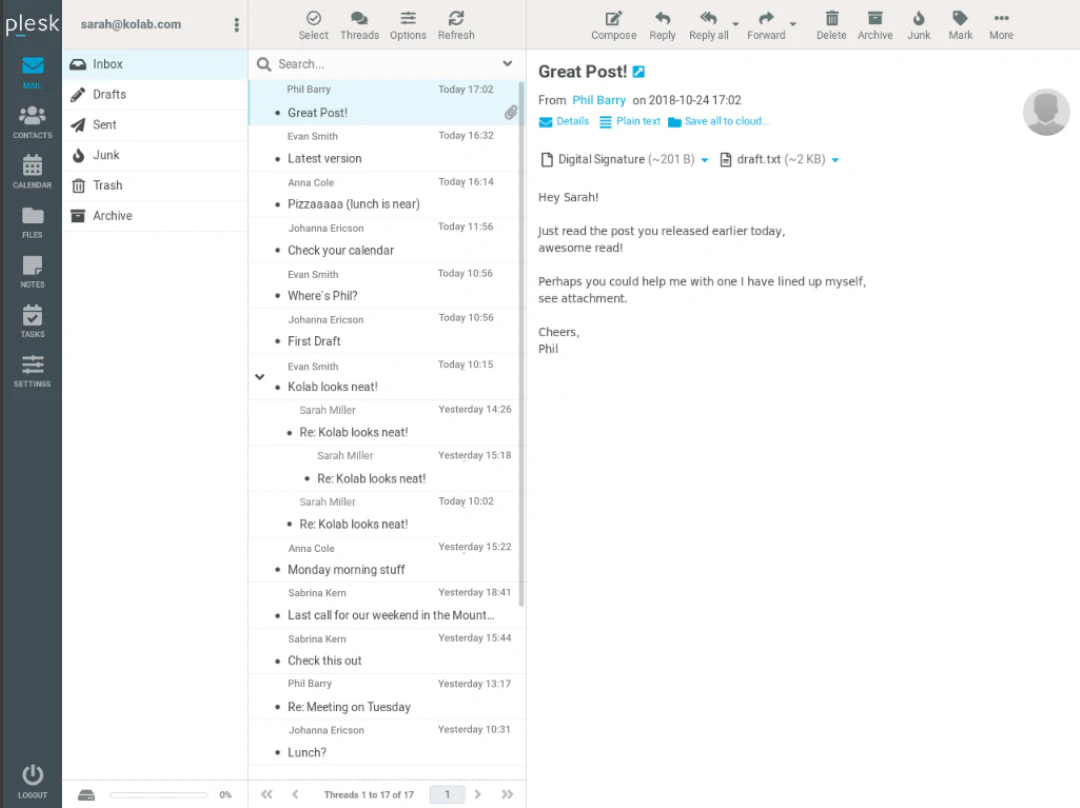
The web interface is easy to understand and use on both PC and mobile devices. GARMTECH web interface is implemented in a traditional style, similar to all known - Gmail, Yandex, Mail.ru, etc.
Key features:
- Drag - & - drop message management;
- Fully equipped address book with groups;
- Spell check;
- Email Automation;
- Built-in cache for quick access to the mailbox;
- IMAP management;
- Support for external SMTP server.
Business email lets your team use addresses on your own domain, such as name@company.lv, instead of free mailbox providers. This improves brand consistency, makes customer communication more trustworthy and keeps business mail tied to your company domain.
We can help create mailboxes, connect domain DNS records, configure webmail access and provide setup details for desktop and mobile mail clients. If you already use another mail provider, we can advise on migration steps and reduce the risk of delivery interruption during the switch.
Reliable business email depends on correct DNS records, mailbox limits, spam filtering and user device settings. GARMTECH can advise on MX, SPF and related domain records so receiving mail servers can better identify your legitimate messages. We can also help separate role-based addresses such as info@, sales@ and support@ from personal employee mailboxes.
When moving from another provider, plan a short migration window, collect current mailbox details and decide whether old mail must be copied or only new mail should arrive on the GARMTECH service. After the switch, test incoming mail, outgoing mail, webmail access, mobile devices and contact forms on the website.
Not necessarily. Email delivery is controlled by DNS records, so the domain can often remain with its current registrar while its mail records point to a different email service. Test the DNS change before retiring old mailboxes.
Changing email hosting has two different tasks: copying or synchronizing mailbox data, and updating DNS so new mail reaches the new service. Keep the old system available until mail flow, authentication and user devices have been checked.
MX routes incoming mail. SPF, DKIM and DMARC support sender authentication and policy. Autodiscovery records may also affect client setup.
No. DNS directs future traffic; it does not copy old messages. Export or synchronize historical mail separately and verify folder counts.